
What questionnaire and outcome measure templates are available?
Why questionnaire templates matter
Every new patient starts with paperwork: intake details, consent, and a baseline read on how they’re doing. Embodia’s template library gives you a running start on all three, with pre-built questionnaires, outcome measures, intake forms, and consent forms you can send to patients right away or customize to fit your practice.
Edit questions, duplicate them, and reorder sections until the form matches exactly what you need. There’s no need to build from a blank page.
How templates are organized
Templates fall into three categories: outcome measures, intake forms, and consent forms. Each category groups templates by purpose, so you can find what you need quickly, whether you’re screening a new patient, tracking progress on a validated measure, or collecting consent before an assessment.
New templates are added to the library over time. If you’re on an Embodia Tier 2 or Tier 3 membership, check your account directly for the most current list — it may include templates not yet reflected here.
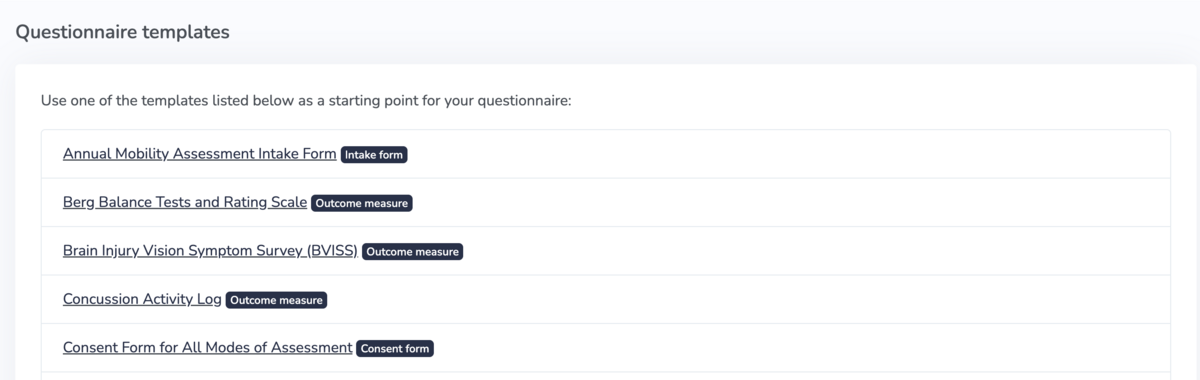
Once you’ve found a template that fits, select it from the library to build your own questionnaire. For a step-by-step walkthrough, see creating questionnaires from a template.
Outcome measure templates
These validated instruments help you track patient-reported outcomes over time:
- Berg Balance Tests and Rating Scale
- Brain Injury Vision Symptom Survey (BVISS)
- Concussion Activity Log
- Cozean Pelvic Dysfunction Screening Protocol
- Depression Anxiety Stress Scales (DASS 21)
- Dizziness Handicap Inventory
- Dynamic Gait Index (DGI)
- Edinburgh Postnatal Depression Scale
- Fatigue Severity Scale
- Fear-Avoidance Beliefs Questionnaire (FABQ)
- Generalized Anxiety Disorder-7 (GAD-7)
- Headache Disability Index
- Index de l’incapacité reliée à la douleur
- Insomnia Severity Index
- Knee Injury and Osteoarthritis Outcome Score (KOOS)
- Lower Extremity Functional Scale (LEFS)
- National Headache Foundation – Headache Diary
- Neck Disability Index (NDI)
- Net Promoter Score (NPS)
- Neurobehavioral Symptom Inventory (NSI)
- Pain Catastrophizing Scale (PCS)
- Pain Disability Index
- Pain Self-Efficacy Questionnaire (PSEQ)
- Pain Stages of Change Questionnaire (PSOQ)
- Patient Health Questionnaire (PHQ-9)
- Patient Rated Wrist/Hand Evaluation (PRWHE)
- Pelvic Floor Disability Index (PFDI-20)
- Pelvic Health Screening (PHS)
- Post-Concussion Symptom Scale
- Shoulder Pain and Disability Index (SPADI)
- Tampa Scale for Kinesiophobia
- The Central Sensitization Inventory (CSI)
- The Fremantle Perineal Awareness Questionnaire (Fre-PAQ)
- The Pelvic Pain Psychological Screening Questionnaire (3PSQ)
- The Rivermead Post-Concussion Symptoms Questionnaire
- The Roland-Morris Disability Questionnaire
- Upper Extremity Functional Scale (UEFS)
- Visual Vertigo Analogue Scale
- Vulvar Pain Functional Questionnaire (V-Q)
Intake form templates
Use these templates to collect background information and screen new patients before their first visit:
- Annual Mobility Assessment Intake Form
- COVID-19 Screening
- Intake Form – General
- Intake Form – Personal Information
- Intake Form – Vestibular
- My Cognitive Rehab Plan
- Pelvic Health Patient History Intake Form
- Pelvic Health Symptom Monitor
- Pelvic Self-Exam for Telehealth
- Screening for Patient with Low Back and Hip Pain
Consent form templates
Collect documented consent before an assessment, treatment, or data-sharing activity with these templates:
- Consent Form for All Modes of Assessment
- Consent Form – General (this consent form has the various ways a patient/client can accept consent. It does not contain other content)
- Informed Consent for Pelvic Health Physiotherapy
- TELUS eClaims – Electronic Transmission Authorization and Consent Form
Building templates from your own PDFs
Already have a questionnaire, intake form, or chart item as a PDF? AI DocBuilder reads your existing PDF and rebuilds it as a fully fillable digital template inside Embodia, so you don’t have to recreate it by hand. It’s available on Tier 3 Practice Management memberships.
Learn how it works in AI DocBuilder: Building fillable forms from existing PDFs.
Related guides
- Creating questionnaires from a template
- AI DocBuilder: Building fillable forms from existing PDFs
- Viewing individual patient questionnaire responses
- Viewing aggregate questionnaire data