
Getting started with Embodia
Everything you need to continue to explore Embodia, including the parts we didn't get to in your demo. Work through it in order, or jump to what you need.
If you're reading this and haven't yet had a demo, you can book one here.
Start your 7-day free trial
Your trial gives you full access to everything in the Practice Management plan, free for seven days.
No commitment, and no credit card required.
The one exception: AI Charting and AI DocBuilder aren't included in the trial. Both come with free credits once you sign up, so you'll still get to put them through their paces.
Set up your clinic, build your charting templates, load your schedule, invite your team. Everything you set up and add is saved, so when you sign up, your practice is already built.
Click the link below to create your account, select a Clinic Membership account type, and follow the prompts to get to your trial!
Onboarding & set-up
You don't have to figure this out on your own. Embodia offers several onboarding resources to help you hit the ground running.
1. Onboarding checklist: Inside your account you'll find an onboarding checklist you can work through at your own pace. 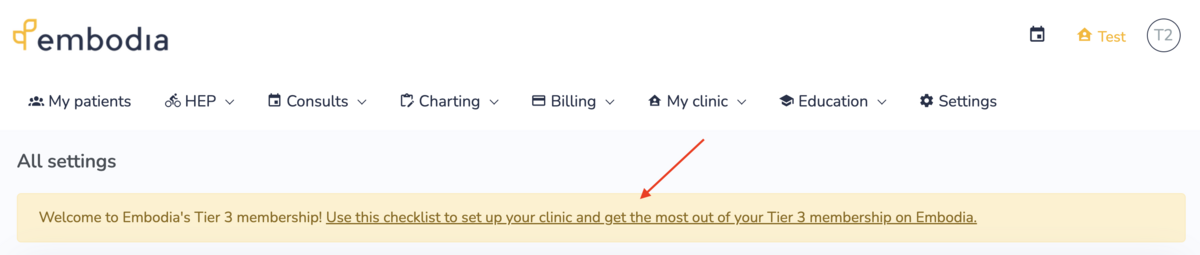
2. Onboarding video: To pair with your checklist, we've also put together a 30 minute step-by-step onboarding video.
3. Guides: Embodia has a full library of guides at your disposal. You can search for quick answers, or explore collections of related guides as lessons. We've included some examples of where to get started below.
4. Onboarding call: Whether it's during your trial or after, we highly recommend you book an onboarding call with our team to iron out any of your questions and make sure everything is set up for your practice's needs. To make the most of your call, we recommend starting (or completing) your checklist first to familiarize yourself with the platform and collect your questions!
What to explore first
Start wherever your practice feels the most friction.
- Charting & EMR: Templates and SOAP notes you can shape around how you actually document
- Scheduling: Waitlists, reminders, online booking, and more
- Billing & invoicing: Payments, superbills, US clearing house integration, Canadian direct billing
- HEP & patient education: A library of 4,500+ exercise videos and patient resources, plus room to add your own
- Communications: HIPAA-compliant telehealth, messaging, email notifications, and optional SMS
- Diaries & questionnaires: Digital patient diaries and outcome measures with analytics
- Clinic-branded patient app: Your clinic's brand, not ours, right down to the app icon
Every feature has a written guide, and many have a short video. We've outlined a few below.
Get oriented
Clinical tools
- Introduction to charting (guide and video)
- Pelvic health content and features
- Telerehabilitation options (incl. a comparison table)
- Introduction to home exercise programs (HEP) (video)
- Your clinic-branded patient app (guide and video)
- External sharing (faxing alternative)
Billing and admin
- Setting up payment methods and accepting credit card payments
- Statistics and reports
- Superbills (guide and video) and OfficeAlly
- Direct billing for Canadian therapists: TELUS eClaims, Greenshield, and HCAI
Connect your other tools
A few common integrations clinicians like to explore:
Plus, you can find an outline of all Embodia integrations here.
AI tools*
- AI Charting: Populating a chart note in minutes (guide and video)
- AI DocBuilder: Building fillable forms from existing PDFs
*Available after sign-up. Free credits included for each.
Making the switch: Data migration
Data migration on Embodia happens in two steps, and includes support whenever you need it. You can find an overview of migrating data to Embodia in this guide, but we'll cover the basics below too.
Note: While Embodia is able to import quite a lot, the full extent of the import highly depends on the export capabilities of your previous system.
Step 1: Importing your patient list
You can do this easily yourself!
Just export your patients, and their details, from your current system as a CSV. Then, set up Patient Properties on Embodia to match the columns of patient information you want to bring across. You don't need Properties for first name, last name, or email, but you do for anything else.
A full walkthrough of this step can be found in this Data Migration Step 1 guide.
You can complete this step anytime during your free trial.
Step 2: Charts, past consults, and invoices
If your current system lets you export your charts as PDFs, you'll zip those up and send us a CSV that maps each file to the right patient, practitioner, and date. Consults (appointments) and invoices can also be imported. A full walkthrough can be found in this Data Migration Step 2 guide.
You can begin Step 2 once you've signed up and have a card on file. You can do all the prep at any time though, including during your trial. The exporting and CSV formatting is done on your side, so having it ready means we can start the moment you're signed up.
When you're at that point and finished your prep, just email support@embodiaapp.com and we'll send you a unique secure upload link. The import itself usually only takes a few days from when we have your files.
Practice Management pricing and discounts
Embodia's Practice Management plan is $45/month per practitioner, but we also have add-ons and various discounts available as well.
Both patient and admin accounts are free of charge, and patients retain access to their prescribed exercise programs and resources regardless of your subscription status.
You can learn more about what's included, and compare plans, on our pricing page.
Optional add-ons:
These are the only (optional) extra costs, everything else you need to run your practice is included in the Practice Management plan.
AI Charting
- Practice Management members enjoy their first 10 hours free.
- After that, should you choose to continue using the feature, a competitive usage-based rate of $0.01/minute would be billed monthly.
- Check out the guide and Introduction to AI Charting video for more information.
- Learn even more on our AI Charting web page.
*Only available with the Practice Management plan
AI DocBuilder (NEW - Beta)
- Practice Management members enjoy their first 50 pages free.
- After that, should you choose to use it, a usage-based rate of $0.10/page would be added to your monthly bill.
- Learn more in this AI DocBuilder guide and blog article (including video-walkthrough example).
*Only available with the Practice Management plan
Clinic Academy
- Offer courses and live webinars to the public and patients.
- Generate even more passive income, and help more people, with course bundles, membership discounts, sales, and promo codes.
- Start at $15/month for your first course before you decide to go with the Pro plan's unlimited courses and full features.
- Learn more on our Clinic Academy web page.
*Available as an add-on to any plan
Clinic discounts
Discounted rates are available for clinics of 3 or more full-time practitioners.
| Practitioners | Discount |
| 3–5 | 10% |
| 6-10 | 15% |
| 11-20 | 20% |
| 21-50 | 25% |
| 50+ | 30% |
Part-time pricing
Embodia offers part-time pricing at $20/mo for additional practitioners with 16 booked hours per week (or less).
Clinics must have a minimum of one member at full price (regardless of hours worked) in order to be eligible to add additional practitioners at part-time pricing.
*Only available with Practice Management plans
Referral program
Referred by a colleague? When you use their referral code, you'll get $20 off your first month, and they'll get $20 off their next. Once you're subscribed, you'll have your own code to provide to others. More on Embodia's referral program in this guide.
Please note: Any integrations can be connected to your Embodia account, however any applicable fees for those connected platforms are independent of Embodia and not included in Embodia's pricing.
When you're ready to sign up
Signing up for a Practice Management plan
If you've started your trial, or already have an account, sign in and then sign up by going to My Clinic > General info. Your trial work carries over, and onboarding and migration support come with you.
Creating an account and starting your trial
Haven't started a trial or created an account yet? Just create your account, select a Clinic Membership account type, and follow the prompts. Your free trial awaits! You can sign-up to a paid membership at any point during your free trial.
We're here for you!
Someone from our team will check in while you explore, to make sure you're getting the answers you need.
Want to walk through anything again first? Feel free to book another demo with our team.
For anything urgent, please email support@embodiaapp.com and we'll get right back to you.