
Setting permissions for the clinic admin
The actions described in this lesson require a Manager permission on your clinic.
To set Clinic admin permissions click on the Settings tab in the top nav bar, and then on Clinic admin permissions under the My clinic section.
Here you can set default permissions for all the Clinic Admins in your clinic or create personalized permissions for each Admin by using the pencil icon.
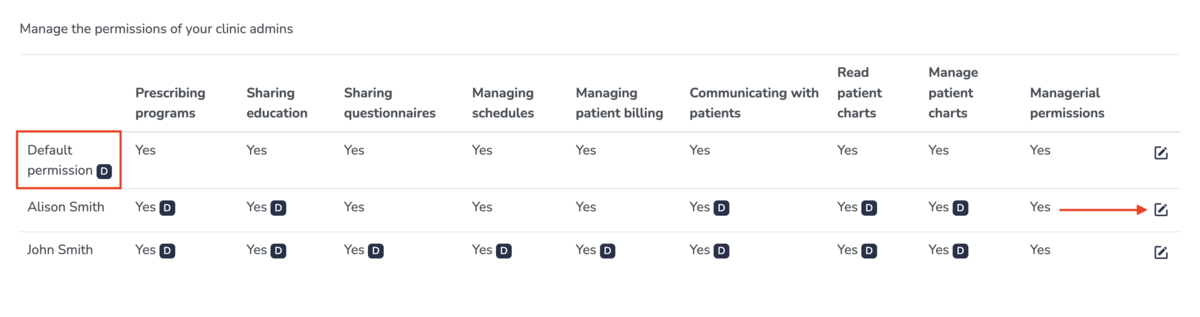
As shown in the screenshot above, you can set the following permissions for each of your Clinic Admins:
- Prescribe programs
- Share education
- Share questionnaires
- Manage schedules
- Manage patient billing
- Communicate with patients
- Read patient charts
- Manage patient charts (read, add new charts, update existing charts, delete charts, sign charts)
- Managerial permissions - this gives the clinic admin permission to manage everything in your clinic, including inviting other practitioners to join your clinic, changing your billing information used on Embodia, setting up your services, your payment methods, your questionnaires, etc. In our guides, everything that requires a managerial permission will start with "The actions described in this lesson require a Manager permission on your clinic."